Thursday, March 14, 2013

Vagrant van down by the river... with fresh ingredients!

***update*** I have moved this content over to http://hh.github.com***

I apologize in advance for the format of this post... I'll be moving to something code based and off blogger.com and this silly webui editor.....

I was super excited to see the release of Vagrant 1.1.0 from Hashicorp! I immediately set about trying out this new ingredient in my instant infrastructure USB deployer.

First step was to use my source_ingredient_vagrant knife plugin to auto download any new versions that might be available into my :file_cache_path and create some data_bag/json files describing the ingredients. The plugin automatically found the new releases for me and updated my data bags!
[hh@M18xR2:~/easybake/oven/repos/cloud-kitchen (master)✗]
☺ ➔  knife source ingredient vagrant
Downloading http://files.vagrantup.com/packages/194948999371e9aee391d13845a0bdeb27e51ac0/Vagrant.dmg to /home/hh/easybake/oven/repos/cloud-kitchen/.chef/cache/Vagrant-v1.1.0.dmg
Downloading http://files.vagrantup.com/packages/194948999371e9aee391d13845a0bdeb27e51ac0/Vagrant.msi to /home/hh/easybake/oven/repos/cloud-kitchen/.chef/cache/Vagrant-v1.1.0.msi
... snip ...
Downloading http://files.vagrantup.com/packages/194948999371e9aee391d13845a0bdeb27e51ac0/vagrant_x86_64.rpm to /home/hh/easybake/oven/repos/cloud-kitchen/.chef/cache/vagrant-v1.1.0_x86_64.rpm 
[hh@M18xR2:~/easybake/oven/repos/cloud-kitchen (master)✗]
☺ ➔  ls .chef/cache/*1.1.0*
.chef/cache/Vagrant-v1.1.0.dmg       .chef/cache/Vagrant-v1.1.0.msi
.chef/cache/vagrant-v1.1.0_i686.deb  .chef/cache/vagrant-v1.1.0_x86_64.deb
.chef/cache/vagrant-v1.1.0_i686.rpm  .chef/cache/vagrant-v1.1.0_x86_64.rpm
[hh@M18xR2:~/easybake/oven/repos/cloud-kitchen (master)✗]
☹ ➔  ls data_bags/vagrant/*1_1_0*
data_bags/vagrant/el_i686_v1_1_0.json
data_bags/vagrant/el_x86_64_v1_1_0.json
data_bags/vagrant/osx_v1_1_0.json
data_bags/vagrant/ubuntu_i686_v1_1_0.json
data_bags/vagrant/ubuntu_x86_64_v1_1_0.json
data_bags/vagrant/windows_v1_1_0.json
The resultant data_bag jason files can be seen at ingredients.easybake.cd or specifically:

https://github.com/easybake-ingredients/vagrant


could upload those vagrant data_bag/ingredients to a chef server, but for now I just add chef-solo-search to my list of recipes to run. It would be really interesting that if used as part of a continuous delivery process, imagine automatically integrate third party ingredients as they update...
In my recipes I set some attributes to specify which externally sourced ingredients ingredients I want to include... and optionally the pinned semantic versions:
easybake-workstation/attributes/default.rb:
default['easybake-workstation']['ingredients']['vagrant']['desc']='Vagrant'
By default we use the latest version of each ingredient:
node['easybake-workstation']['ingredients'].each do |data_bag,attrs|
  all_artifacts = search(data_bag,
"os_#{node.platform}:#{node.platform_version} AND arch:#{node.kernel.machine}")
node.default['easybake-workstation']['ingredients'][data_bag]['version']=\
all_artifacts.map{|v| v['version']}.flatten.uniq.sort.last
We then search for the desired ingredient and ensure it's in the cache, and eventually set the path to the local file for it.For vagrant we just install the package specified by the ingredient attribute.
query = "version:#{node['easybake-workstation']['ingredients'][data_bag]['version']}"
search(data_bag,query).each do |ingredient|
    cache_file = File.join(Chef::Config[:file_cache_path], ing['filename'])
# ... ensure cache is populated
    node.default['easybake-workstation']['ingredients'][data_bag]['file']=cache_file
end
For vagrant we just install the package specified by the ingredient attribute.
easybake-workstation/recipes/vagrant.rb
dpkg_package 'vagrant' do
  source node['easybake-workstation']['ingredients']['vagrant']['file']
end
Obviously there is some work to be done to the easybake-workstation to make it work on all supported platforms, chef ingredients at this point are really conceptual, but I hope this real world example helps generate some discussions.

[hh@M18xR2:~/easybake/oven/repos/cloud-kitchen (master)✗] 
☺ ➔  sudo chef-solo -c .chef/solo.rb 
/home/hh/easybake/oven/repos/cloud-kitchen/.chef
Starting Chef Client, version 11.4.0
Compiling Cookbooks...
Recipe: easybake-workstation::ingredients
  * remote_file[/home/hh/easybake/oven/repos/cloud-kitchen/.chef/cache/7601.17514.101119-1850_x64fre_server_eval_en-us-GRMSXEVAL_EN_DVD.iso] action create (skipped due to not_if)
  * file[/home/hh/easybake/oven/repos/cloud-kitchen/.chef/cache/7601.17514.101119-1850_x64fre_server_eval_en-us-GRMSXEVAL_EN_DVD.iso.checksum] action create (up to date)
  * remote_file[/home/hh/easybake/oven/repos/cloud-kitchen/.chef/cache/virtualbox-4.2_4.2.8-83876~Ubuntu~precise_amd64.deb] action create (skipped due to not_if)
  * file[/home/hh/easybake/oven/repos/cloud-kitchen/.chef/cache/virtualbox-4.2_4.2.8-83876~Ubuntu~precise_amd64.deb.checksum] action create (up to date)
  * remote_file[/home/hh/easybake/oven/repos/cloud-kitchen/.chef/cache/vagrant-v1.1.0_x86_64.deb] action create (up to date)
  * file[/home/hh/easybake/oven/repos/cloud-kitchen/.chef/cache/vagrant-v1.1.0_x86_64.deb.checksum] action create
    - create new file /home/hh/easybake/oven/repos/cloud-kitchen/.chef/cache/vagrant-v1.1.0_x86_64.deb.checksum with content checksum 09dc73
        --- /tmp/chef-tempfile20130314-31126-1cpzs0a 2013-03-14 11:23:44.030889110 -0700
        +++ /tmp/chef-diff20130314-31126-1lw8m9t 2013-03-14 11:23:44.026889064 -0700
        @@ -0,0 +1 @@
        +70024b642757517f7fc0747f736055f8b3e2febe669c779addfb6a014c848c79
  * remote_file[/home/hh/easybake/oven/repos/cloud-kitchen/.chef/cache/Sublime Text 2.0.1 x64.tar.bz2] action create (skipped due to not_if)
  * file[/home/hh/easybake/oven/repos/cloud-kitchen/.chef/cache/Sublime Text 2.0.1 x64.tar.bz2.checksum] action create (up to date)
Converging 46 resources
Recipe: easybake-workstation::default
  * package[git] action install (up to date)
  * package[g++] action install (up to date)
  * package[libxml2-dev] action install (up to date)
  * package[libxslt-dev] action install (up to date)
Recipe: easybake-workstation::ingredients
  * remote_file[/home/hh/easybake/oven/repos/cloud-kitchen/.chef/cache/7601.17514.101119-1850_x64fre_server_eval_en-us-GRMSXEVAL_EN_DVD.iso] action create (skipped due to not_if)
  * file[/home/hh/easybake/oven/repos/cloud-kitchen/.chef/cache/7601.17514.101119-1850_x64fre_server_eval_en-us-GRMSXEVAL_EN_DVD.iso.checksum] action create (up to date)
  * remote_file[/home/hh/easybake/oven/repos/cloud-kitchen/.chef/cache/virtualbox-4.2_4.2.8-83876~Ubuntu~precise_amd64.deb] action create (skipped due to not_if)
  * file[/home/hh/easybake/oven/repos/cloud-kitchen/.chef/cache/virtualbox-4.2_4.2.8-83876~Ubuntu~precise_amd64.deb.checksum] action create (up to date)
  * remote_file[/home/hh/easybake/oven/repos/cloud-kitchen/.chef/cache/vagrant-v1.1.0_x86_64.deb] action create (skipped due to not_if)
  * file[/home/hh/easybake/oven/repos/cloud-kitchen/.chef/cache/vagrant-v1.1.0_x86_64.deb.checksum] action create (up to date)
  * remote_file[/home/hh/easybake/oven/repos/cloud-kitchen/.chef/cache/Sublime Text 2.0.1 x64.tar.bz2] action create (skipped due to not_if)
  * file[/home/hh/easybake/oven/repos/cloud-kitchen/.chef/cache/Sublime Text 2.0.1 x64.tar.bz2.checksum] action create (up to date)
Recipe: easybake-workstation::virtualbox
  * dpkg_package[virtualbox] action install (up to date)
Recipe: easybake-workstation::vagrant
  * dpkg_package[vagrant] action install
    - install version 1.1.0 of package vagrant
  * gem_package[vagrant-windows] action install
    - install version 0.1.2 of package vagrant-windows
  * gem_package[em-winrm] action install
    - install version 0.5.4 of package em-winrm
  * gem_package[knife-windows] action install (up to date)
  * git[/home/hh/easybake/oven/repos/cloud-kitchen/.chef/cache/veewee-gem] action sync
    - clone from git://github.com/jedi4ever/veewee.git into /home/hh/easybake/oven/repos/cloud-kitchen/.chef/cache/veewee-gem
    - checkout ref 94608e0e16a54ac57008d0dad242768d8ddef05d branch HEAD
  * execute[build veewee gem] action run
    - execute gem build veewee.gemspec
  * gem_package[veewee] action install
    - install version 0.3.7 of package veewee
  * link[/opt/vagrant/bin/veewee] action create
    - create symlink at /opt/vagrant/bin/veewee to /opt/vagrant/embedded/bin/veewee
  * package[openjdk-6-jre-headless] action install (up to date)
  * file[/etc/profile.d/vagrant_path.sh] action create
    - create new file /etc/profile.d/vagrant_path.sh with content checksum e8ff03
        @@ -0,0 +1 @@
        +export PATH=$PATH:/opt/vagrant/bin

Monday, July 23, 2012

:ii (Instant Infrastructure) and Sputnik

I've recently spent time a good amount of time working on :ii (Instant Infrastructure) and thought I'd catch folks up a bit on my work.

:ii (Instant Infrastructure) is my attempt at providing a single usb that could create the infrastructure for a community library, medical clinic, or school and optionally having them centrally managed.

:ii started out as a cookbook with network pxe-boot based replication-of-os-installation-image happening over the network, but I have forked dell-recovery ( the software that Dell uses to create the os-recovery partition) to migrate the os-replication to use usb.

The recovery partition will allow end users to 'factory restore' the entire disk without using external media or network. Combined with the Ubuntu OOBE (Out Of Box Experience) selection of roles below, we can have re-usable, retaskable laptops that require very minimal IT infrastructure. Any of these machines with the recovery partition could create new :ii usb sticks

Just before ChefConf2012 I came across an initiative from Dell that overlapped a bit with :ii. Sputnik is a project to create a profile tool that would enable sharing of software selections (ppas and package lists) via a git repo. Similar to :ii but focusing only on ppa/package profiles. They hope to be able to ship the Dell XPS13 with an option to ship a Ubuntu image with this tool.

I did a demo for Dell on a loaned XPS13 that used a oem-usb install that I customized for use with hosted-chef and uploaded my sputnik-cookbook.

I think this tool could be very interesting to folks deploying chef-managed laptops anywhere.

During the Out Of Box Experience, as soon as the user account was created, I launch chef-client to register the new computer with the chef-server and present the node editor to the user upon first login.

I would like to upgrade this approach by integrating a Ubiquity Plugin, so that selection of roles, and available chef-servers could occur during OOBE.

It should be possibly to also use  local chef-solo repo checkout on the usb-stick.

However my work a Sputnik is a bit on-hold until Dell moves things forward a bit, so I'm primarily focusing on the ways it overlaps with :ii.

I'm looking for companies that might be interested in funding further works on either of these projects (I'm not employed by Dell or on the approved vendor list, but maybe your company is). Taking me on as a part or full time employee to work on your infrastructure would be a great idea. 8)

Please reach out to me at chris@hippiehacker.org.

Friday, May 6, 2011

Opening up the Box for our Youth and Future

I think it's important that people have the freedom to open up any 'box' they purchase and understand how it works, modify it, and do something new and creative with it. When you lose the ability to change the way something works, you put yourself at an extreme disadvantage.

For example, a Pak 'n-Sav in Hamilton opened on Good Friday... with no employees present. Someone forgot to program the building not to turn on the lights or open the doors as it does normally each day.

Apple II


When I was is school, it was actually mandatory that we learn to program computers. We had a computer lab with a bunch of Apple II machines with green screens. We'd write some simple BASIC programs that had a number in front of each line to control the order of the commands and which one to GOTO next.

GO TO '10'


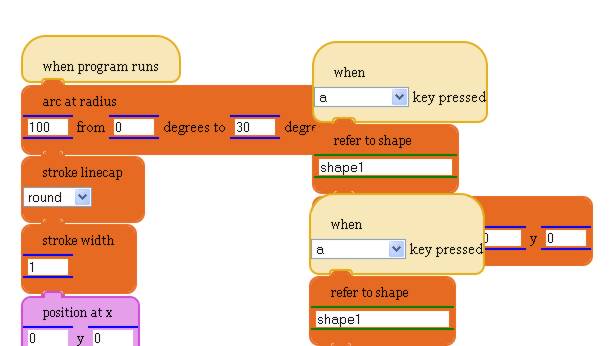
In college, one of my professors designed a programming language he named after Bacchi which was laid out visually using a mouse. It generated computer code suitable compilation into programs. Fairly novel back in 1994, but it appears we have evolved.

Nowadays, a waterbear isn't just an small animal popular with scientists in labs, it's also a new visual programming language. It just runs in any HTML5 compliant web browser (basically anything pretty recent). You can try it out at waterbearlang.com


So great, now we have a visual language that we can write scripts to run on the web, but what about getting underneath the hood and understanding how to write something more complex. How about giving cheap computers away that can fit on your keychain?

The lead guy over at the software company Frontier Games has designed a new small computer that will cost around $15-25 and can be given away to students to help them learn how computers work. It will probably run Ubuntu and it sounds like we are about 12 weeks away from seeing them on the market.

HDMI/TV out on the left, keyboard on the right. Computer in the middle.


But for the short term, we have some free training next week from some folks that know a bit about programming. Google has a programming event  in San Francisco that you can attend via the net for free next week. They often reveal new technology that may affect the future as we know it.

It's our future. What will we make of it?

I say we start with open minds and boxes.


ps. I'm looking for work in the Tauranga area. If you are a technology company please send me an email or call/txt me at 022-077-5899.

Thursday, March 10, 2011

ChiliProject up in minutes on Heroku w/ Gmail and S3

Requirements

  • Heroku account
  • Gmail account ( or sendgrid account ) if you want to send email
  • Amazon S3 account if you want to store documents and files
The S3 account requires a credit card to setup, but has a free tier
with 5 GB of Amazon S3 storage, 20,000 Get Requests, 15GB of bandwidth
each month.


Walk-through

ChiliProject via git

mkdir groupprojects
cd groupprojects
git init
 
git remote add chiliproject https://github.com/chiliproject/chiliproject.git
git fetch chiliproject
git merge chiliproject/master
 
git add .
git commit -m 'clean version of base code' 

Heroku, Giternal and Rails via Bundler

# create the Gemfile
cat << EOF | tee Gemfile
source :rubygems 
gem 'rails', '2.3.5' 
gem 'i18n', '0.4.2' 
gem 'giternal' 
gem 'heroku' 
EOF
git add Gemfile
git commit -m 'Added Gemfile for rails, i18n, heroku, and giternal' 
 
# install bunlder then use it to install the gems in the Gemfile
gem install bundler
bundle install

Heroku App

Let's configure a place to push the code to! Choose your name well as
it sets up up my-project-name.heroku.com, so choose a good unused name.

heroku create my-project-name
All the configuration should happen with heroku config environment
variables. We'll put the at the beginning of each section, then
install components and configure them to use the ENV variables.

  • Note that this just configures environment variables on the heroku instance. We would need to export these to the local environment to do any local development.

Session Store and Secret

heroku config:add SESSION_SECRET=`ruby -e 'require "rubygems" ; require "active_support" ; \
   puts ActiveSupport::SecureRandom.hex(40)'` 
cat << EOF | tee config/initializers/session_store.rb
ActionController::Base.session = { 
  :session_key => '_redmine_session', 
  :secret => ENV['SESSION_SECRET'] 
} 
EOF
git add -f config/initializers/session_store.rb
git commit -m 'Added session key and secret to be populated via env variables' 

Gmail

heroku config:add GMAIL_SMTP_USER=username@gmail.com GMAIL_SMTP_PASSWORD=your-password
cat << EOF | tee config/giternal.yml
action_mailer_optional_tls: 
  path: vendor/plugins
  repo: http://github.com/collectiveidea/action_mailer_optional_tls.git
EOF
git add config/giternal.yml
 
giternal update
sed -i '' "\:vendor/plugins/action_mailer_optional_tls:d" .gitignore
 
git add vendor/plugins/action_mailer_optional_tls/
 
cat << EOF | tee config/initializers/gmail_tls.rb
if ENV['GMAIL_SMTP_USER'] and ENV['GMAIL_SMTP_PASSWORD'] 
  ActionMailer::Base.perform_deliveries = true 
  ActionMailer::Base.smtp_settings = { 
    :address => "smtp.gmail.com", 
    :port => 587, 
    :authentication => :plain, 
    :domain => ENV['GMAIL_SMTP_USER'], 
    :user_name => ENV['GMAIL_SMTP_USER'], 
    :password => ENV['GMAIL_SMTP_PASSWORD'], 
    :tls => true 
  } 
end 
EOF
git add config/initializers/gmail_tls.rb
git commit -m 'Added support for GMAIL that comes from ENV' 

Amazon S3

heroku config:add S3_ACCESS_KEY=your-access-key S3_SECRET_KEY=your-secret-key S3_BUCKET_NAME=your-bucket
 
cat << EOF | tee -a config/giternal.yml
redmine_s3: 
  path: vendor/plugins
  repo: https://github.com/edavis10/redmine_s3.git
EOF
git add config/giternal.yml
 
giternal update
 
sed -i '' "\:vendor/plugins/redmine_s3:d" .gitignore
git add vendor/plugins/redmine_s3/
 
cat << EOF | tee config/s3.yml
production: 
  access_key_id: <%= ENV['S3_ACCESS_KEY'] %>
  secret_access_key: <%= ENV['S3_SECRET_KEY'] %>
  bucket: <%= ENV['S3_BUCKET_NAME'] %> 
  cname_bucket: false 
 
development: 
  access_key_id: <%= ENV['S3_ACCESS_KEY'] %>
  secret_access_key: <%= ENV['S3_SECRET_KEY'] %>
  bucket: <%= ENV['S3_BUCKET_NAME'] %> 
  cname_bucket: false 
EOF
git add config/s3.yml
 
git commit -m 'Added s3 configuration that pulls keys and bucket from env variables' 

plugin assets

This dir needs to exist on heroku side, and is populated when the
plugins are installed. However git doesn't track directories, only
files.

mkdir public/plugin_assets
echo this must exist >  public/plugin_assets/README
git add -f public/plugin_assets/README
git commit -m 'Added plugin_asset dir for Heroku' 

pushing our code out to the configured heroku instance

First we push our local changes out, this may take a bit as we are uploading all our code.

git push heroku master
Now that our code is up, we want to setup the database and load
the default data set.

heroku rake db:migrate
heroku rake redmine:load_default_data REDMINE_LANG=en
You could login at this point, but it might be interesting to go ahead and disable the default admin account and create our own.

# lock default admin user account
heroku console "x=User.find(1) ; x.lock ; x.save" 
 
heroku console "user = User.new { |u| u.login='hacker'; \
       u.firstname='Hippie'; u.lastname='Hacker'; \
       u.mail='hhh@hippiehacker.org'; \
       u.admin=true; u.language='en'; \
       u.password='XXXXX' } ; \
       user.preference=UserPreference.create!(:time_zone=>'Auckland') ; \
       user.save! " 
There are a few settings you'll probably always want to set right off. Here's how to do it programattically.

# get your hostname and settins your URL value within the app settings
heroku console "setting = Setting.find_or_create_by_name('host_name') ; \
       setting.value=ENV['URL'] ; setting.save! " 
 
heroku console "title = Setting.find_or_create_by_name('app_title') ; \
      title.value='Our Little Cows' ; title.save! " 
 
heroku console "setting = Setting.find_or_create_by_name('welcome_text') ; \
       setting.value='Yet Another Cool Website' ; setting.save! " 
Format the heroku config for use as local variables:

heroku config --long | sed s/\>// | sed s/\^/export\ / | sed s/\ \*\=\ \*/=\"/ | sed s/\$/\"/
Finally launch the site in the browser.

heroku open

Monday, August 30, 2010

Home Brew solar powered cell phone towers now a reality

I knew it would be a big thing back when I saw software radios being introduced back in the late 90's that could run open software, but not setting up inexpensive cell phone networks has become a reality and I know I want to be involved. For around $4500 you can setup a cell phone tower that is solar powered, self contained and can be used to bring voice calling and texting to an area that has absolutely no service. Connect that to the internet, and you have international calling at extremely reasonable rates. Ability to set this up in a relief zone where there is no infrastructure? Priceless.

Tuesday, August 24, 2010

SHSH Blobs and Installing Older Versions of iOS

We have several iOS devices, and all of them are jailbroken. Apple put restrictions on what versions of their software you can run on the hardware you purchased from them. They literally say today you can install version X, but tomorrow you can only install version Y. When you try to install the operating system on your iPhone/iPod/iPad, they make you ask them (over the internet) if it's ok! I think that the walled garden they are trying to create started feeling like a prison long ago.

The technology they use to keep the door of the prison shut is based on digital signatures. You have to get an apple 'signature of permission' to install a particular version of the operating system that runs on the device. This signature is specific to both that exact device and software version combination. You can and should save these digital 'signatures of permission' so that you can install older software after apple decides to stop granting permission.

I recently had to do that myself using a combination of Firmware Umbrella and the fact that Saurik's Cydia retrieves and stores these signatures for you if you ask it to. If Saurik has your specific device + software version signature, then you can ask him for it when you try to install new software on your phone.

Basically you change your computer to go to Saurik's server at 74.208.10.249 when you ask to goto gs.apple.com. It pretends to be that apple server that hands out signatures (or that refuses to once they choose to force you to upgrade). I was stuck for a while until I realized that you need to put the device in DFU mode.


Even if you don't want to jailbreak for whatever reason, I would suggest saving your 'signatures of permission' (SHSH blobs) with Firmware Ubrella.